Migos Viral Video Examples
Explore Migos viral video examples, see the two photos behind a real generated clip, and learn what to check before making your own version.
Use examples to judge the format, not to predict your result
A Migos viral video usually pairs an unexpected duo with the recognizable orange booth and microphone. These examples show the format. The two-photo tutorial shows a real male/female result alongside its inputs, so you can compare source photos with the generated performers.
Check both performers, not only the first frame
Watch the whole clip. Look for recognizable faces, consistent clothing and a natural relationship between the two performers. A convincing thumbnail does not prove that identity stays stable during movement.
Listen to the soundtrack as well as watching the motion
The preset result includes audio. Enable sound when reviewing the examples and check that performance and soundtrack work together. Your download is a video file for your own editing workflow.
Treat sample clips and your own output differently
A sample demonstrates the effect, while your generated clip depends on the photos you supply. Use clear individual photos and start with a short preview. Pet and character ideas are creative options rather than a guarantee that every reference will work equally well.
Create your own version after comparing the inputs
Choose two photos, generate a 4-second test and compare the finished subjects with your references. Download the clip you want to keep, then crop, caption or combine it in your preferred editor before sharing.
Zwei Fotos. Sehen Sie sich die Transformation an.
Laden Sie für jede Person ein separates Foto hoch und wählen Sie dann „Jetzt generieren“ aus. Dieses reale Beispiel zeigt das Video, das aus den beiden Fotos unten erstellt wurde.
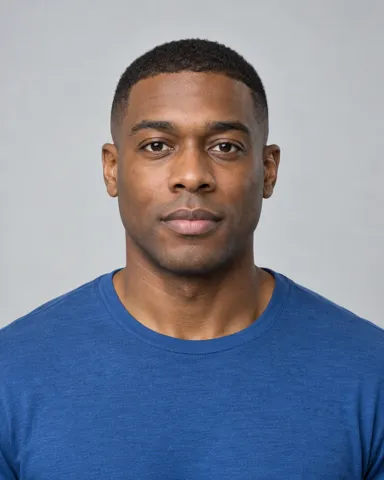

3. Wählen Sie „Jetzt generieren“.
Entdecken Sie Migos AI Video-Videobeispiele
Beispielbeispiele des Orange-Booth-Duettformats. Laden Sie zwei Fotos hoch, um Ihre eigene Version zu erstellen.
Migos AI Video-FAQs
Choose your next step
Migos AI Video Generator — Two Photos, One Duet →
Generate a Migos AI video from two photos. Choose 4 or 15 seconds, compare quality and credit cost, then preview and download your orange-booth duet.
Migos AI Trend →
Learn the Migos trend AI format: two performers, an orange booth and one microphone. See how to turn your photos into a short duet video.
Migos Hotel Lobby AI →
Make a Migos Hotel Lobby AI video from two photos. Learn the orange-booth format, check a real example and start with a free 4-second preview.
Free Migos Hotel Lobby AI Video →
Generate and preview one free 4-second, 480P Migos AI video with a new account. An active subscription is required to download the free result.
How to Do the Migos AI Trend →
Follow a practical Migos AI trend tutorial: choose two photos, select 4 or 15 seconds, review your video and download the finished duet.